For California school district offices

The analysis is done before the board asks.

District Focus gives every leader in your district office an assistant that reads your contracts, spending and records and hands back the finished brief or board item, with every number traced to its source.

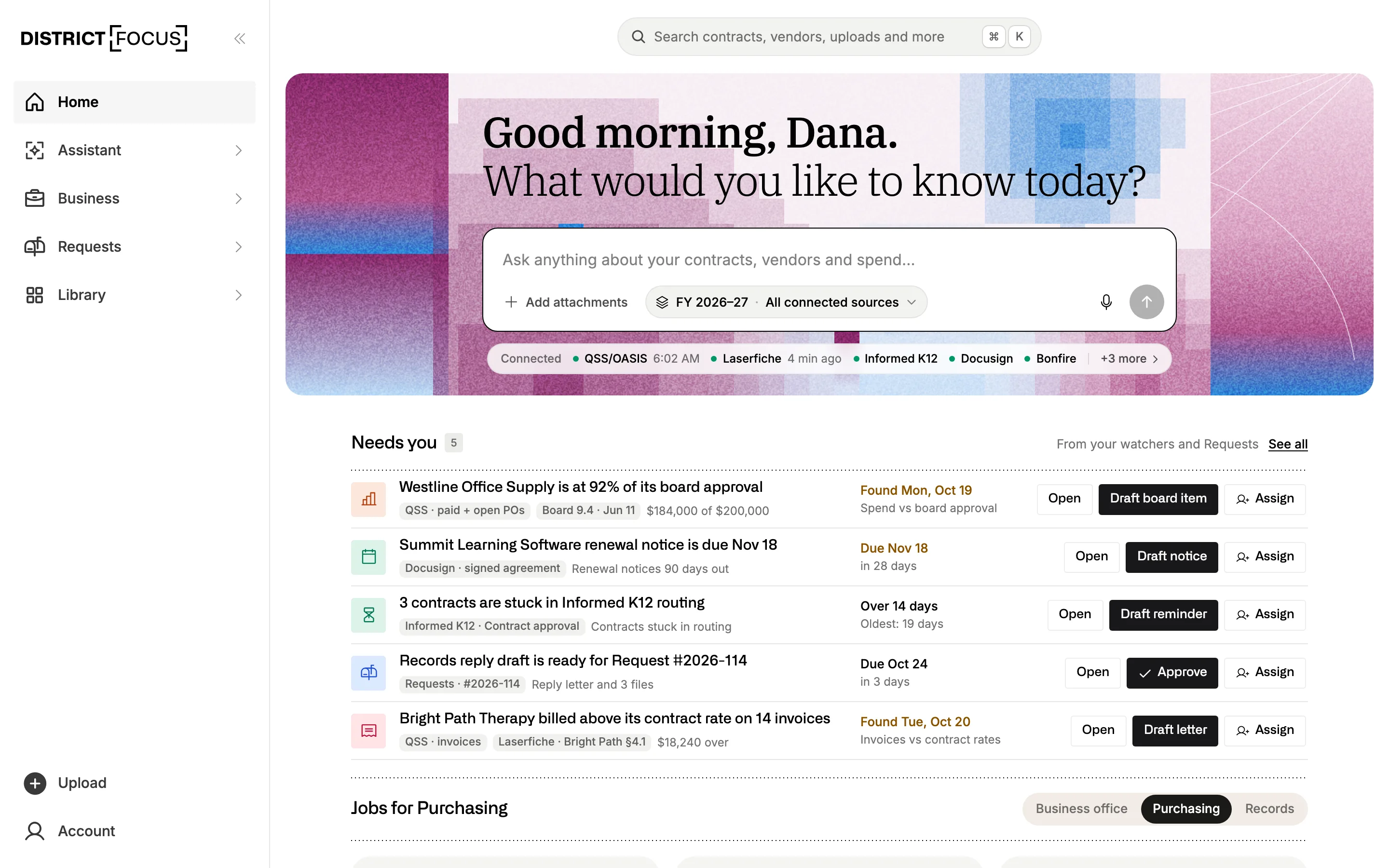
District Focus Home for a chief business official: a box to ask anything about contracts and spend, the connected systems with their sync times, and a Needs you list with five items, such as an office supplier at 92% of its board approval and a renewal notice due November 18.

District Focus is an AI assistant built for the people who run a school district’s office. It starts from everything your district has signed, spent and received, checks your prices against similar districts, and brings back work you could put in front of the cabinet or the board.

The work

Give it the work you’d otherwise do at night.

Ask the way you’d ask a sharp analyst down the hall. It reads what it needs, runs the numbers and writes the finished piece, and your staff check it before anything goes out.

  1. 01 Superintendent

    You ask: A trustee wants to know why we hold five tutoring contracts. Draft my answer, with sources, by Thursday.

    It hands back: A one-page reply that lists each contract, what it costs and what it’s for, with every figure linked to the page it came from.

  2. 02 Business services

    You ask: What renews in the next 90 days, and which of those renew on their own if we do nothing?

    It hands back: A renewals brief with each notice date, cap and auto-renewal clause, and the notice letters drafted on your letterhead.

  3. 03 Purchasing

    You ask: Here’s the copier quote. Is each line fair against districts our size?

    It hands back: Each line set next to what similar districts paid, wherever we hold their prices, with the number of districts behind each comparison.

  4. 04 Special education

    You ask: Compare our speech, OT and behavior agency rates with districts our size.

    It hands back: A rate table by position and vendor, and a short brief you can take to cabinet before the contracts renew.

  5. 05 Technology

    You ask: Where are we paying for software seats nobody uses?

    It hands back: The licenses in your technology contracts set against enrollment and staff counts, with the next decision date on each.

  6. 06 Records

    You ask: A request just came in for the bus contract and two years of invoices.

    It hands back: The records pulled from your files, private details marked for your review, and the reply drafted inside the 10-day window.
The platform

The Assistant works on top of your district’s records.

Three parts of District Focus keep those records read, current and tied to the systems that hold them. The Assistant works across all of them.

Assistant

Takes a question all the way to a finished draft.

It reads your records and the public ones, from board agendas to bid notices and state data, runs the analysis and writes the brief, board item or letter in your district’s format. Recurring work runs on a schedule, and it takes the next step in your tools once you approve.

Explore the Assistant
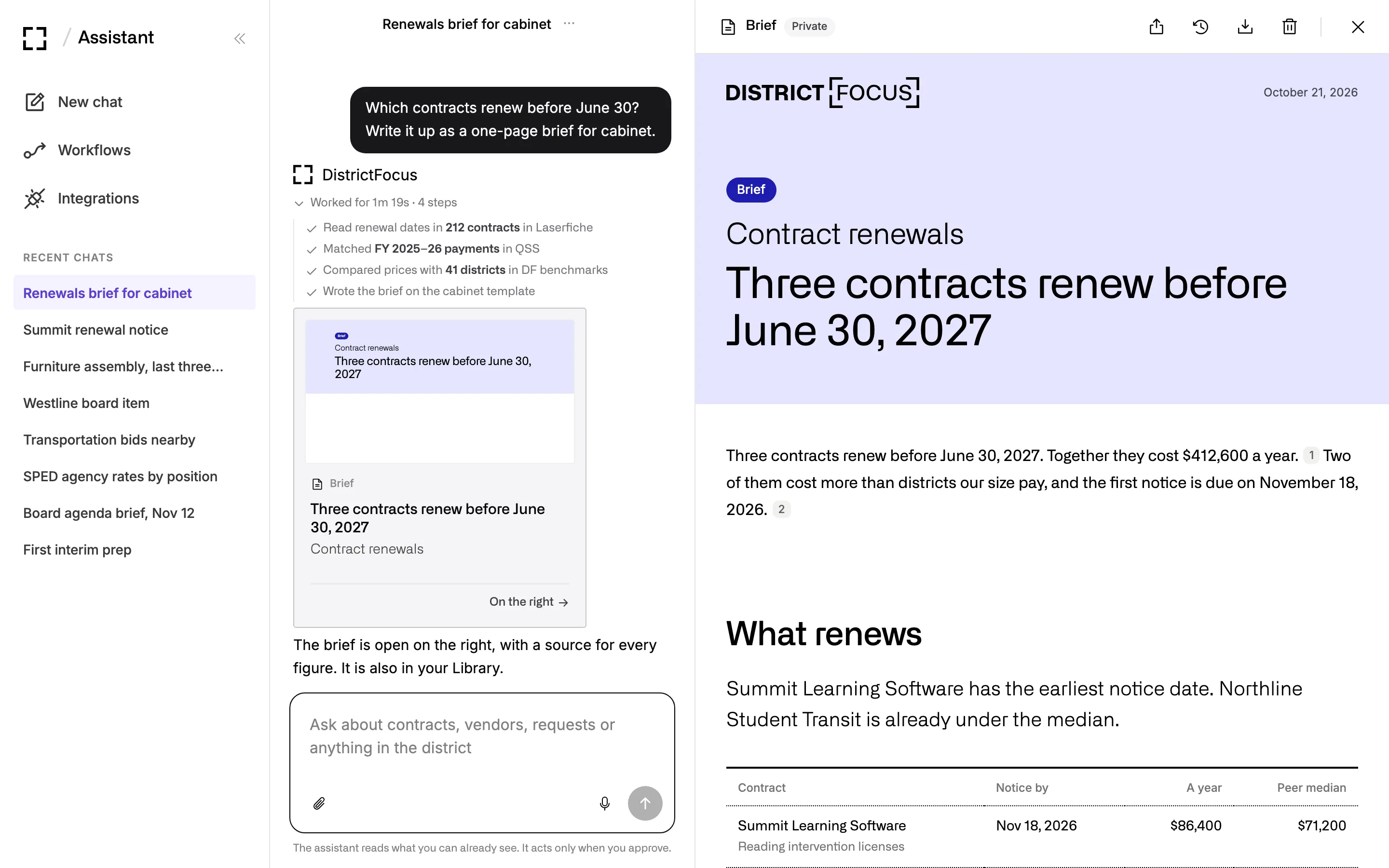
The Assistant after a request for a cabinet brief on contract renewals: four steps that read 212 contracts in Laserfiche, matched payments in QSS and compared prices with 41 districts, and the finished brief open beside the chat.
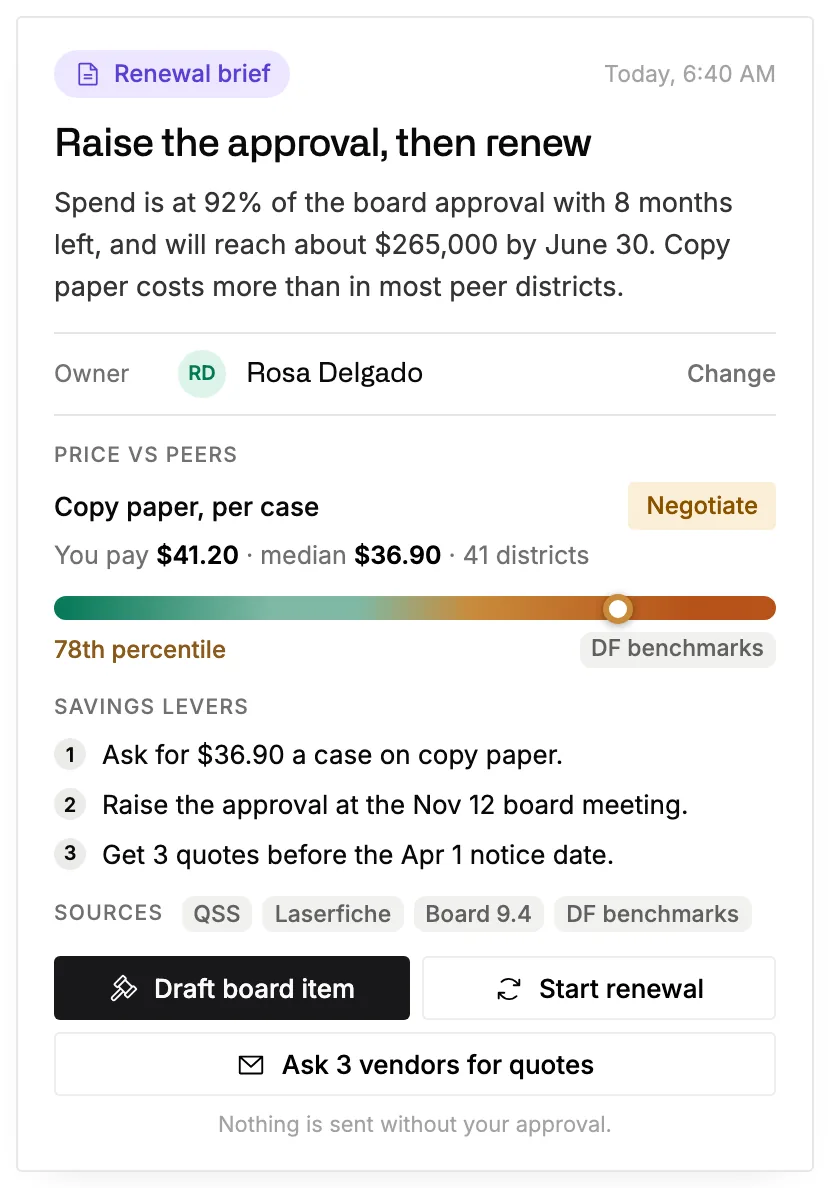
  • A renewal brief for an office supplies contract: spend at 92% of the board approval with eight months left, copy paper priced above the median of 41 districts, three savings steps and the sources behind them.

    Contracts & Spend

    Knows what you signed, what you’ve spent and what’s due.

    It reads each contract page by page and keeps the signed amount, the not-to-exceed cap and actual spend apart by fiscal year. Renewals come with their notice dates, and your prices sit next to what similar districts pay.

    Explore Contracts & Spend
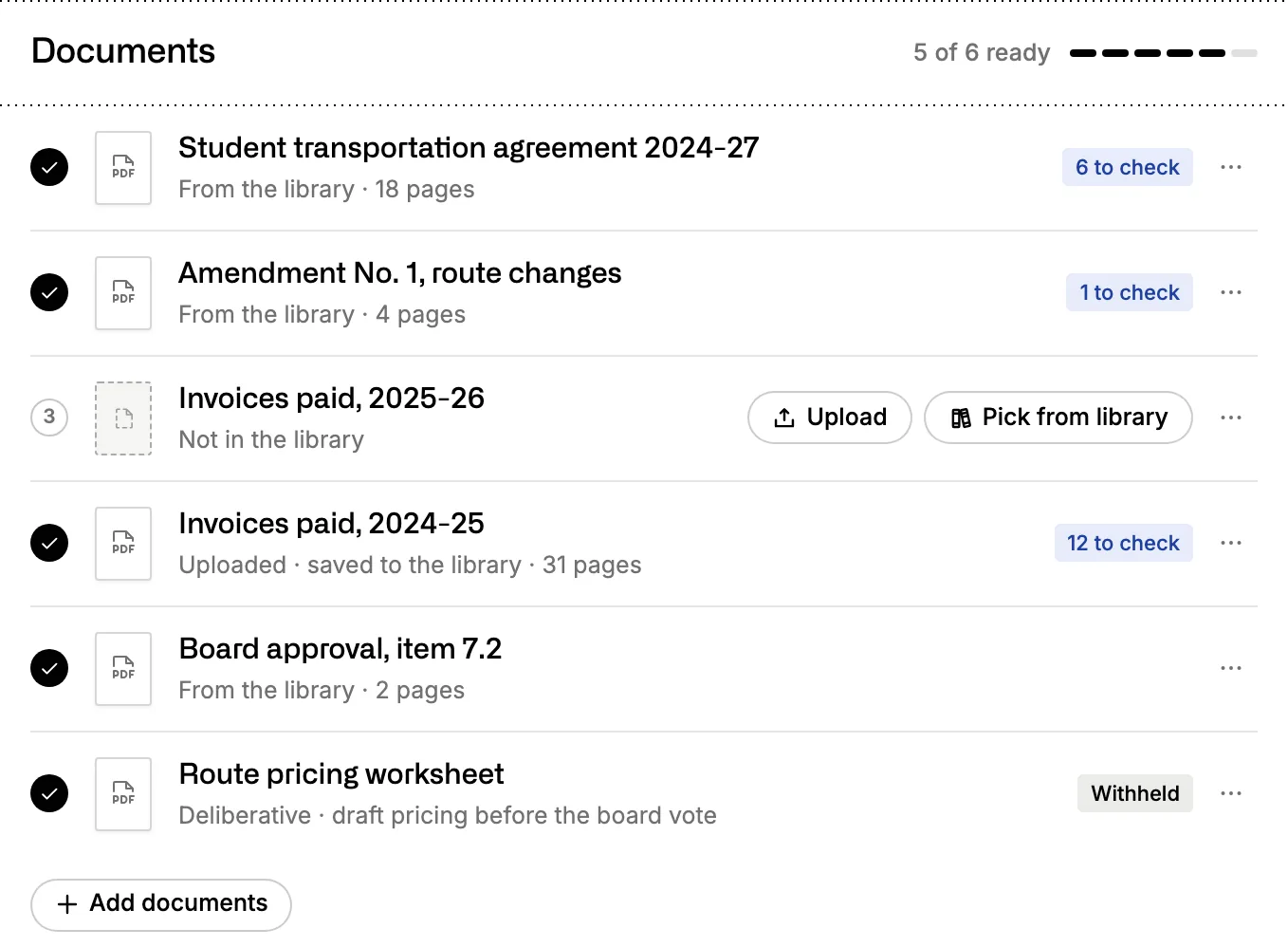
  • The document checklist for a records request: five of six records found, several with private details marked to check, one missing with an upload button, and one draft withheld.

    Records Requests

    Answers public records requests on the clock.

    Every request is logged with its deadline. The Assistant finds the records, marks private details for redaction with the reason for each, and drafts the reply for a staff member to send.

    Explore Records Requests
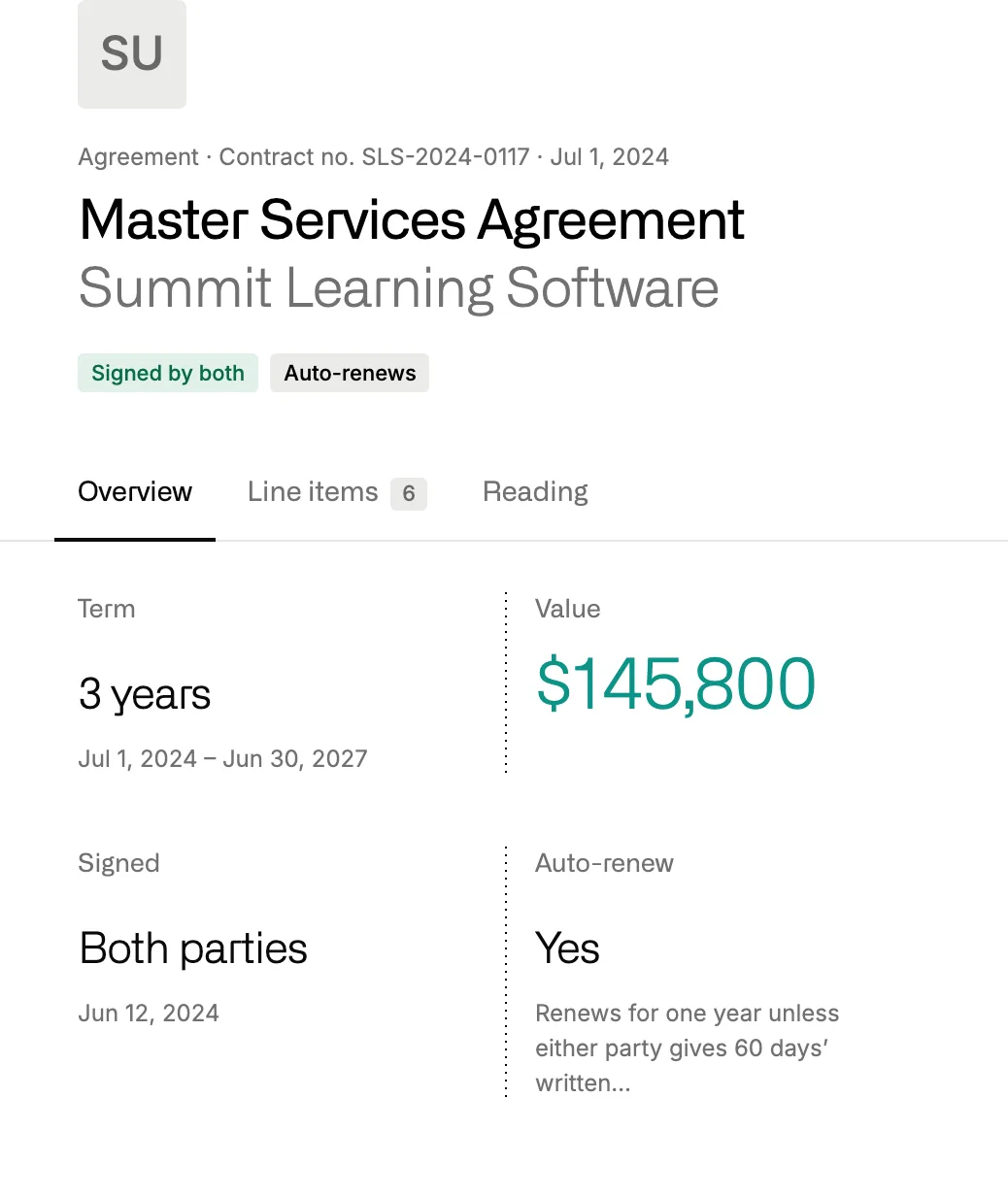
  • A master services agreement read by District Focus: a three-year term, a value of $145,800, signed by both parties, and an auto-renewal unless either side gives 60 days’ notice.

    Library

    Keeps every document where your staff can find it.

    Contracts, board items, letters and everything the Assistant writes sit in one place your whole team can search. Each file is read for its dates, its value and how it renews.

    Explore the Library

Who it’s for

Made for the people who answer to the board.

Each office works from the same records, and the Assistant knows the calendar each one runs on, from first interim to E-rate deadlines.

  • 01

    Superintendents

    It answers trustee questions with sources and briefs you on the contract items on the agenda before the board meets.

    Try asking

    What should I be ready to speak to at Tuesday’s board meeting?

  • 02

    Business Services

    It tracks renewals ahead of their notice dates, checks quotes against similar districts and drafts fiscal notes for the CBO and purchasing.

    Try asking

    Make a ranked savings list for the first interim, with how sure you are about each item.

  • 03

    Special Education

    It compares agency and NPS rates with similar districts by position, and writes the cabinet brief before the contracts renew.

    Try asking

    This agency sent next year’s rate sheet. What changed for each position?

  • 04

    Technology

    It checks software seats against enrollment, keeps track of privacy agreements and watches your E-rate deadlines.

    Try asking

    Which software renews in the next 60 days, and which renews on its own?

Why District Focus

A general chat tool only knows what you paste into it.

Many of your staff already use one. District Focus starts with your district’s records already read and connected, and it knows what similar districts pay.

  1. 01

    It reads your district’s systems.

    Contracts, POs, bids and board items come straight from the systems that hold them, and each payment is tied to the contract and the board approval behind it.

  2. 02

    It knows what other districts pay.

    Your prices are compared with similar districts, and each comparison shows how many districts stand behind it. A chat tool that sees only your own files can’t make that comparison.

  3. 03

    It hands back work you can check.

    Board items, renewal briefs and records replies come back finished, and every number opens the page it came from.

  4. 04

    It works where your staff already are.

    Staff who prefer their own AI chat app can ask District Focus from inside it, with their own login and permissions.

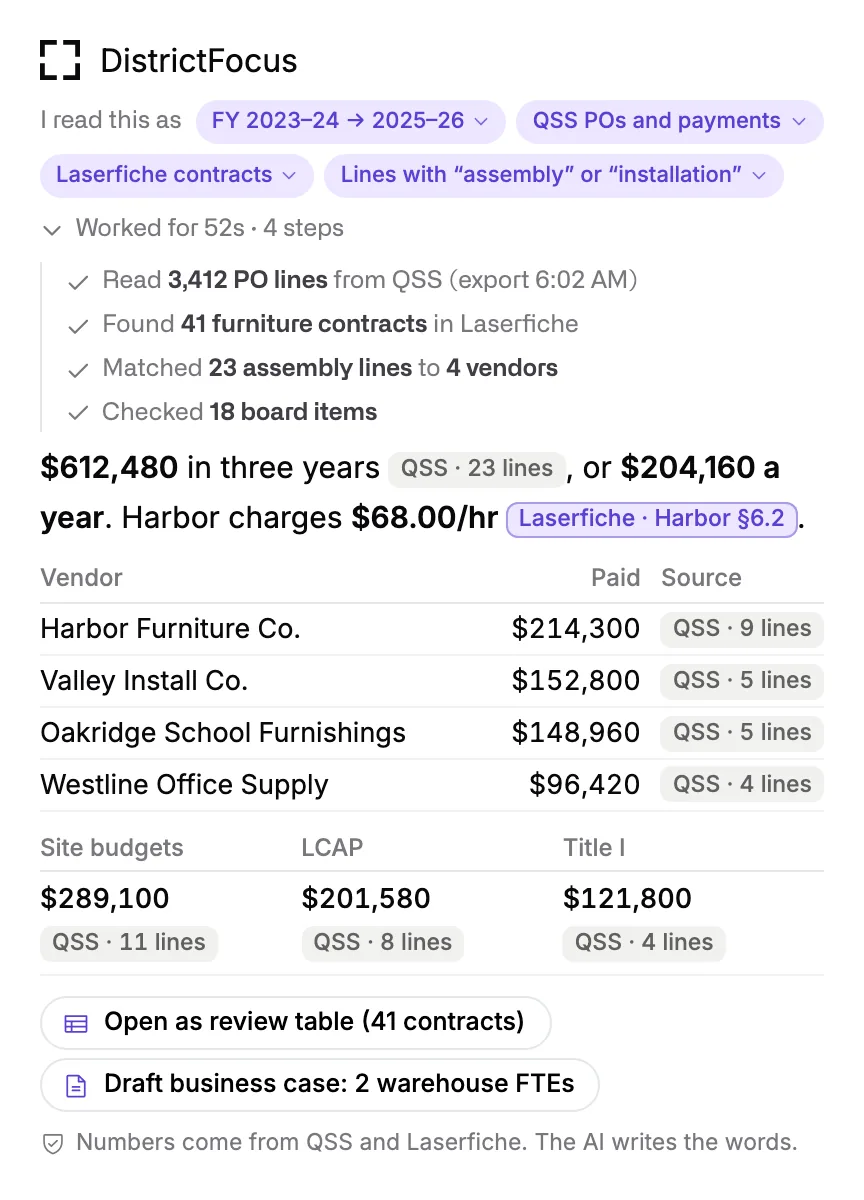
An answer about three years of furniture assembly spend: the steps name 3,412 PO lines from QSS and 41 contracts in Laserfiche, each figure carries a chip for its source, and a note says the numbers come from QSS and Laserfiche while the AI writes the words.

Connections

Works with the systems you already run.

Your admin connects each system once and decides what District Focus can read and do. Board agendas, E-rate data and state enrollment figures come built in.

  • Laserfiche Documents
  • Informed K12 Approvals
  • Docusign Signatures
  • BoardDocs Board
  • County finance (QSS) Finance
  • Munis Finance
  • Aeries Staff and schools
  • PowerSchool Staff and schools
  • ClassLink App usage
  • Google Drive Files
  • SharePoint Files
  • Gmail E-mail
  • Outlook E-mail
  • Microsoft Word Documents
  • USAC E-rate Public data
  • CDE Public data
  • Bonfire Bids
  • The web Search and public sites

Not on the list? A nightly export or a shared folder works too.

Trust

Your district’s records stay your district’s.

Short answers for your privacy review. The full detail, from where your data lives to what we keep, is on our trust page.

How we handle your data
  • 01

    Each district works in its own space.

    People from another district can’t open your files, documents, chats or requests.

  • 02

    We don’t train models on your data.

    Every AI call goes to a model endpoint that keeps no copy of what we send.

  • 03

    Every action is logged.

    The log shows who asked, which tool the Assistant used, which records it read and when.

See what it would take off your desk.

Bring a task you’d hand off. We’ll show you the Assistant doing that kind of work, and answer your privacy questions in the same call.