Business Services

Catch the renewal before it renews itself.

The Assistant reads the contracts and POs your office holds, checks your prices against districts your size and drafts the notice, the fiscal note or the board item while there’s still time to act.

Board questions, renewal notices and vendor quotes all end up in the business office, and each one needs someone to read the fine print. The Assistant does that reading across your POs, contracts and board approvals, then hands you a fiscal note, a letter or a ranked list you can sign off on.

The work

The checking your office never gets to, done before it’s due.

Ask the way you’d ask an analyst down the hall. It reads the files, compares the prices and writes up what it found in your district’s format.

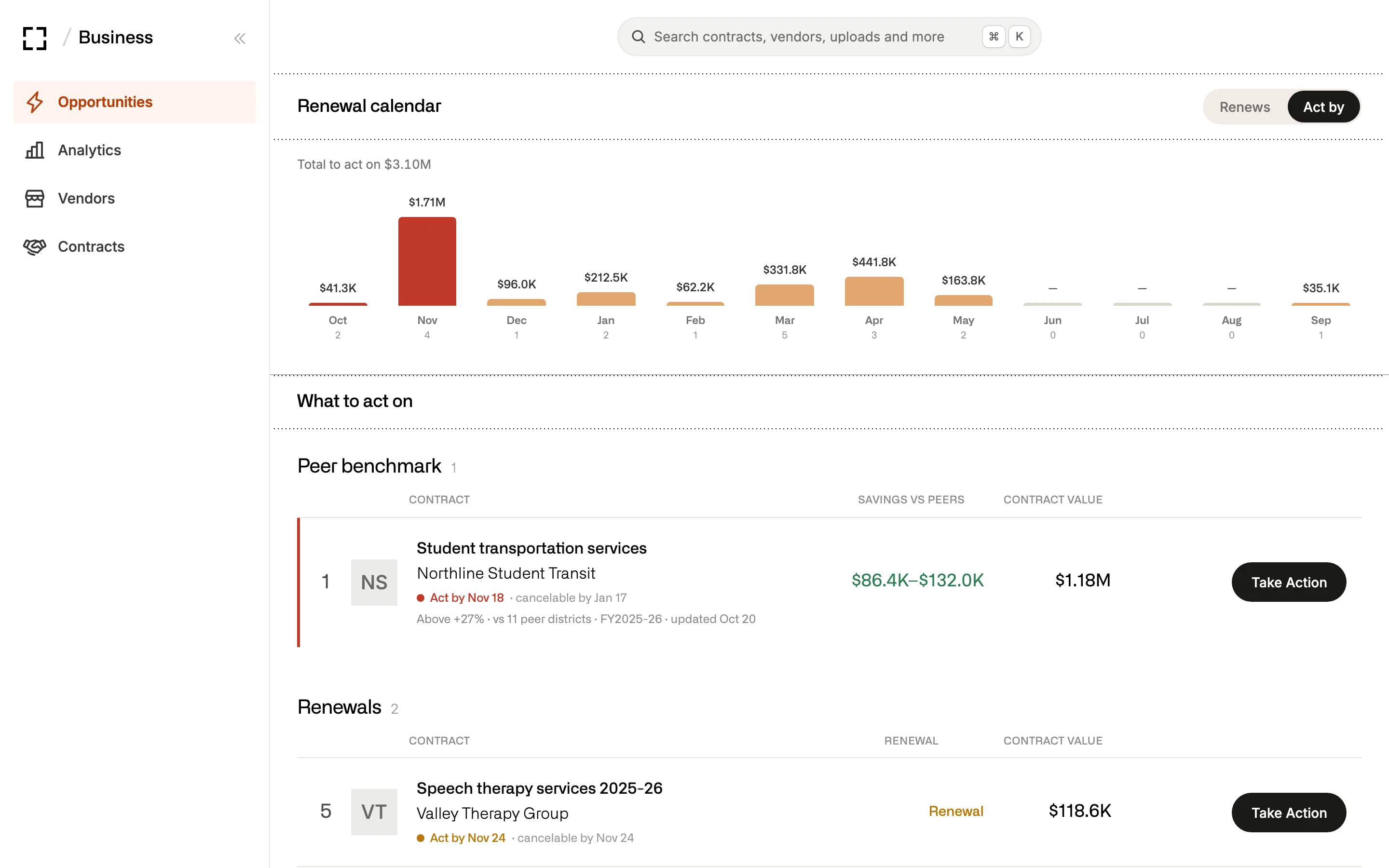
Flags each renewal while there’s still time to say no.

It reads the term, notice and auto-renewal clauses in each agreement, puts every notice date on one calendar and drafts the non-renewal notice or the request for quotes before the window closes.

Try asking

What renews in the next 90 days, and which ones renew on their own if we do nothing?

A renewal calendar of notice deadlines by month, with November selected and the contracts to act on listed below it.

Tells you whether a quote is fair.

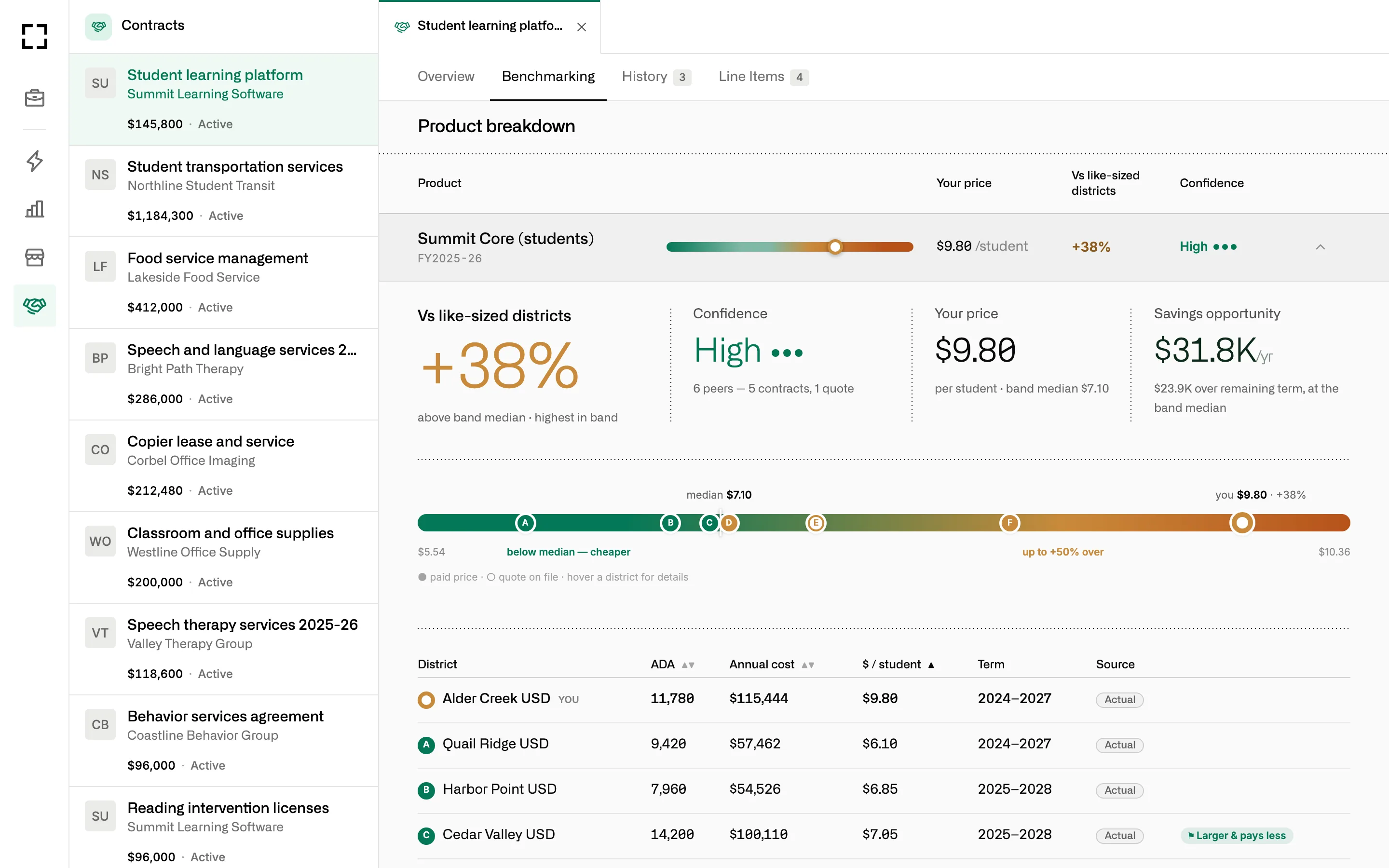
Attach a vendor’s quote and it checks each line against what districts your size paid, where a peer price exists. On state-contract buys, where everyone should pay the same, it shows you who pays less.

Try asking

Here’s the copier quote. Is each line fair against districts our size?

A contract’s benchmarking tab: the price per student against like-sized districts, a confidence rating, the savings opportunity and a dot plot of peer prices.

Warns you before spending passes what the board approved.

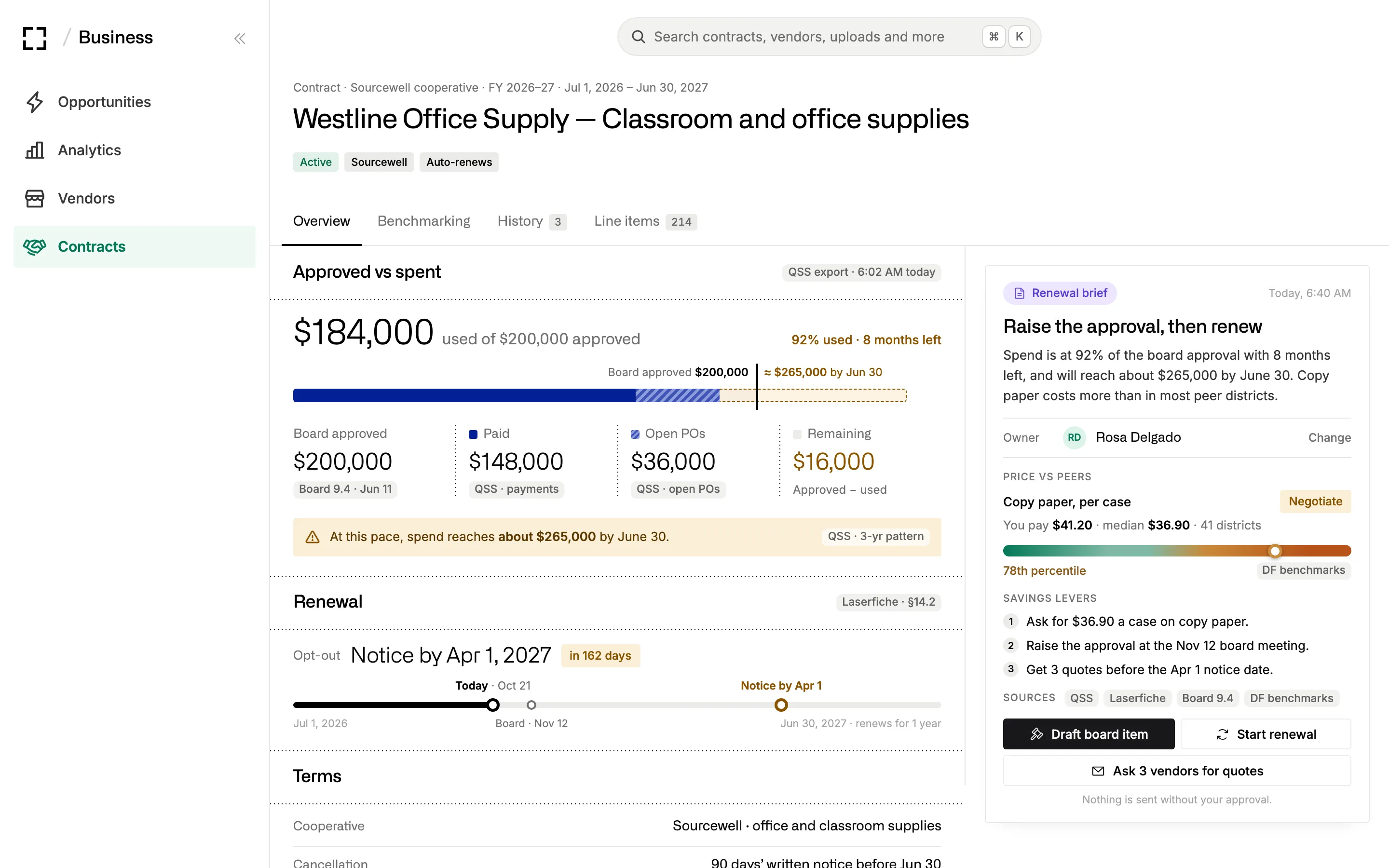
It matches each PO to its board item, co-op resolution or contract and tracks paid and open amounts against the cap, so you hear about it at 80% with months left to act.

Try asking

How much have we spent under the office-supplies co-op resolution against what the board approved? Warn me at 80%.

A contract page showing $184,000 used of a $200,000 board approval, a pace warning, the notice date and a renewal brief.

Writes the fiscal note and the board item.

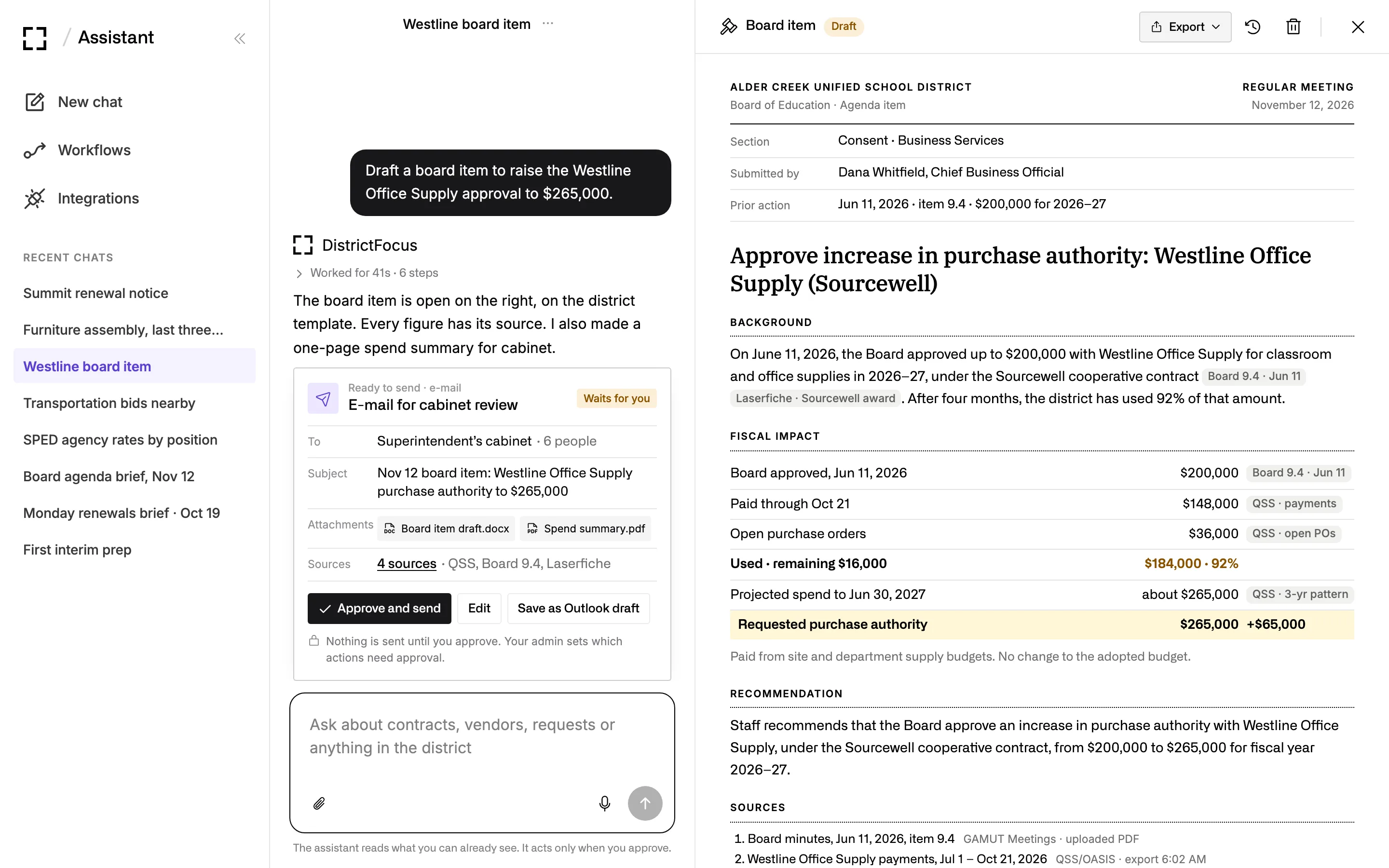
Consent items, fiscal impact tables and co-op resolutions come back on your district’s template, with each figure tied to the PO, invoice or contract it came from.

Try asking

Write the fiscal note for the video-conferencing renewal on next week’s consent agenda.

A chat with a Ready to send card for cabinet beside a board item drafted on the district template, with a fiscal impact table.

Answers the three-year question from every PO line.

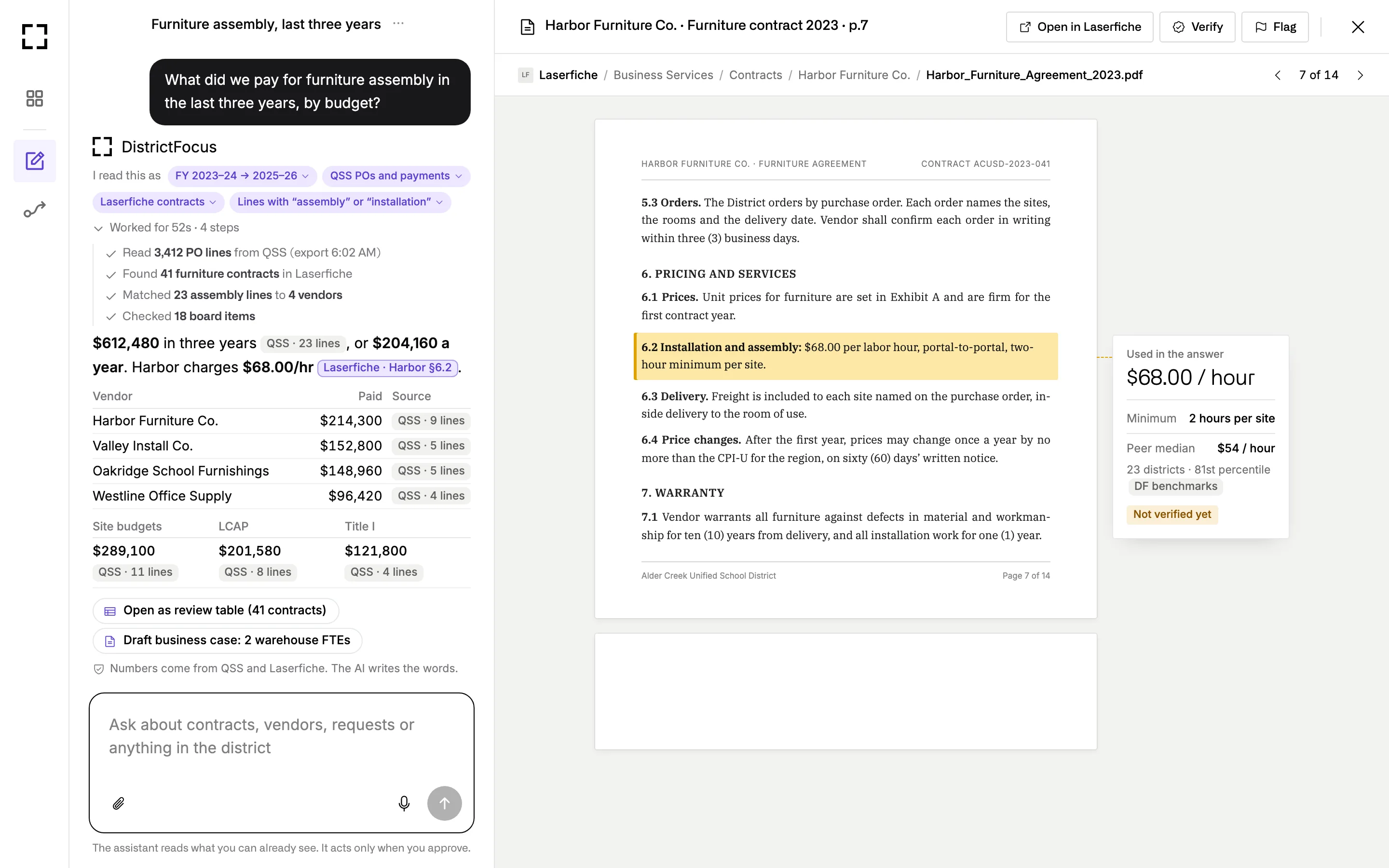
Ask what something cost across every vendor and budget, and it reads the PO lines, the contracts and the clauses behind them, then shows its math and the page each number came from.

Try asking

What did we pay for furniture assembly over the last three years, across every PO, and from which budgets?

An answer totaling three years of furniture assembly spend from 3,412 PO lines, with a source on each figure, beside the contract clause it cites.

Standing work

Set a watch once and stop checking by hand.

Watches and routines run on their own schedule, read the systems you’ve connected and put anything that needs you on your Home page.

Needs you

Monday’s checks are done before you sit down.

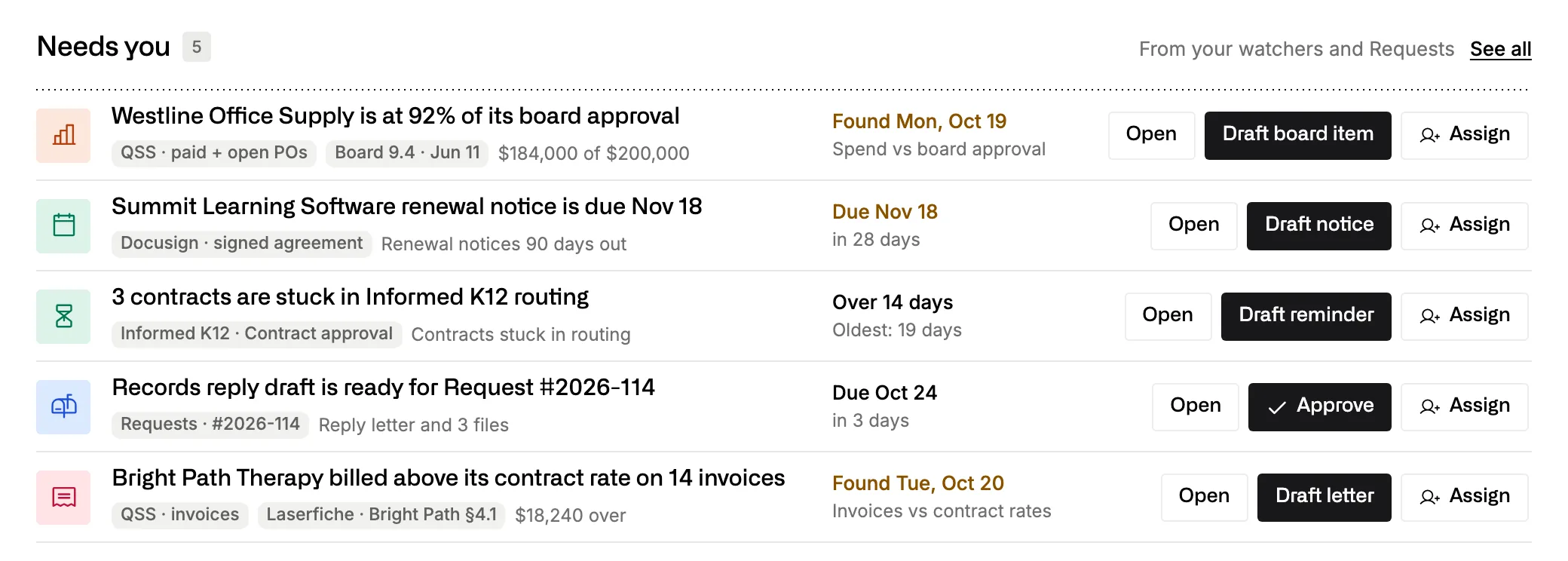
Spending near a board approval, a notice date coming up, contracts stuck in routing, an invoice above the contract rate: each one arrives with its sources and a draft ready to open.

Try asking

On the 15th of each month, draft a request for quotes for every contract that ends in 120 days.
The Needs you queue on Home: an office supply contract at 92% of its board approval, a renewal notice due Nov 18, contracts stuck in routing and an invoice above the contract rate.

Shared threads

Purchasing and the CBO work in the same thread.

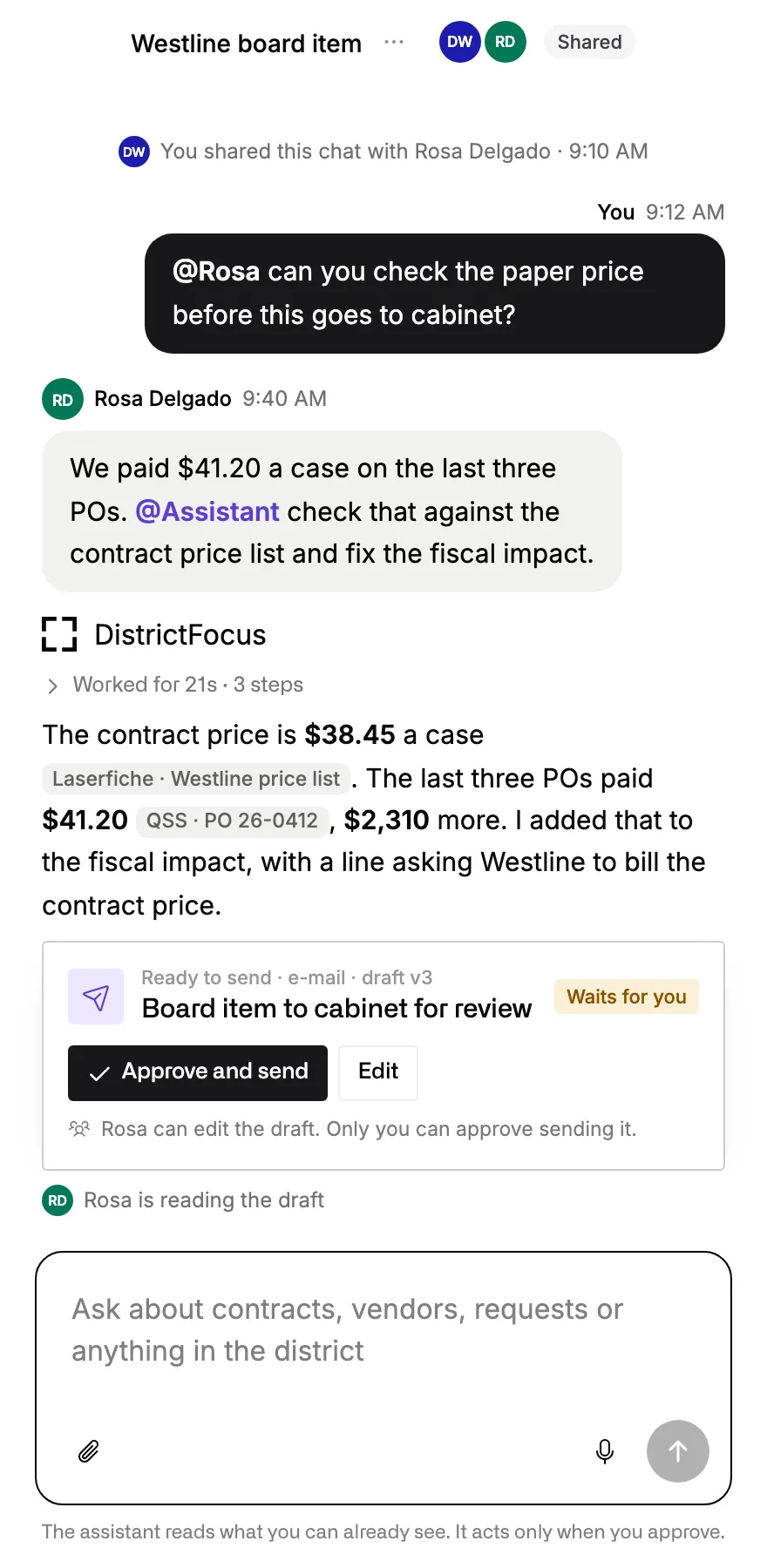
Your buyer can check a price and correct the draft in a shared chat. Only the person who owns the item can approve sending it, and everyone can see who changed what.

A shared chat where the Director of Purchasing asks the Assistant to check a price, and it corrects the fiscal impact and waits for the CBO’s approval.

Contract files

Read the contract before you sign the PO.

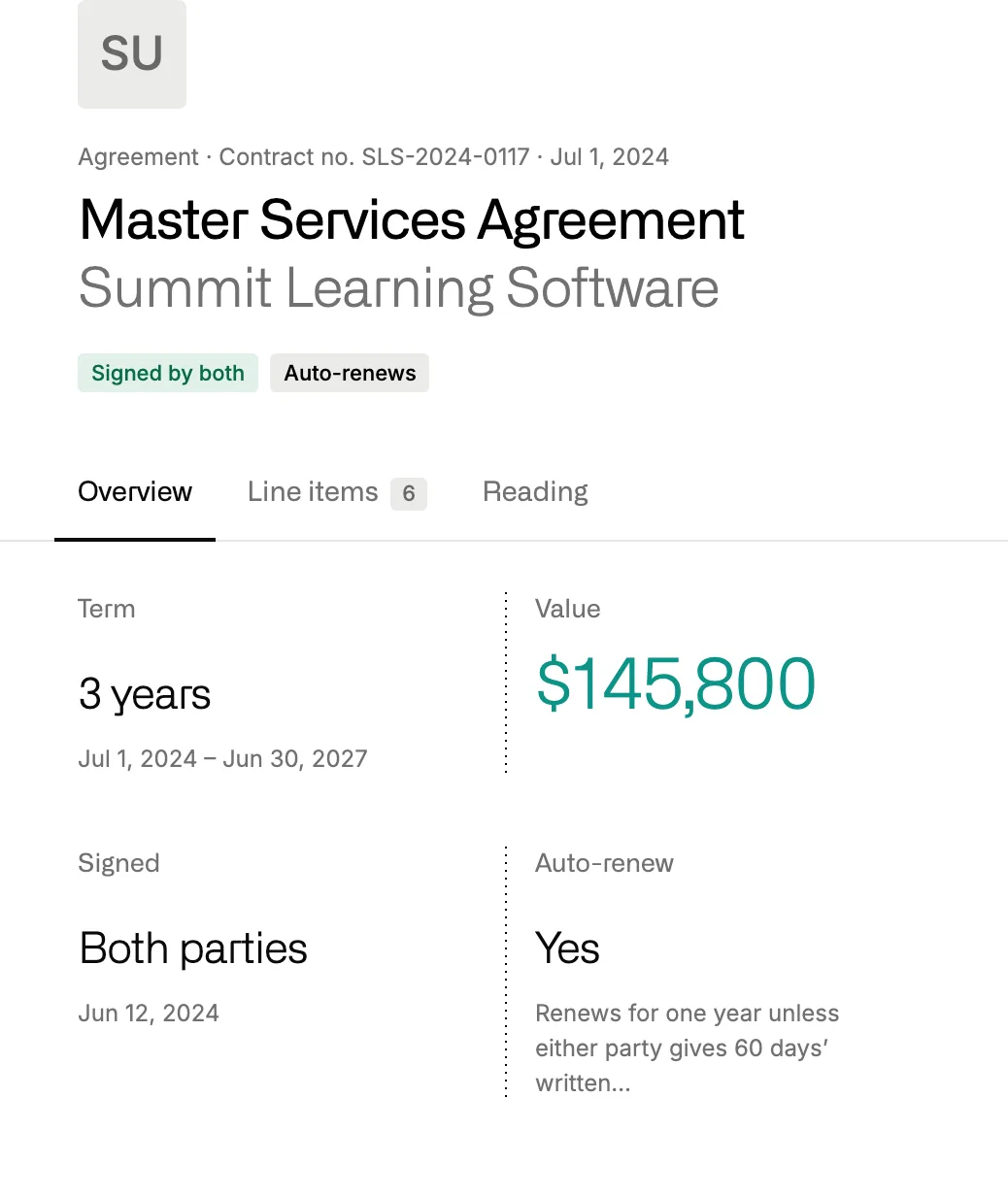
Upload an agreement or point the Assistant at Laserfiche, and it pulls out the term, cap, auto-renewal and notice period, each linked to its page, before anyone signs.

Try asking

Summarize this services contract before I sign the PO: scope, cap, term, auto-renewal and indemnity.

About Contracts & Spend
A master services agreement read by District Focus: three-year term, $145,800 value, signed by both parties, auto-renews with 60 days’ notice.

Your year

Your fiscal year, from July 1 to the adopted budget.

Hang routines on the state’s fiscal calendar and your own board dates, and the analysis is ready before each one.

  1. Every board meeting Coming up

    Contracts approved, and POs and warrants ratified on consent.

    Ed Code 17604

    What the Assistant hands you: Fiscal notes, and the PO list for ratification with any price above similar districts flagged.

  2. Any purchase Coming up

    Formal bids above $119,100 in 2026, or another legal path such as a piggyback or a co-op.

    PCC 20111, 20118

    What the Assistant hands you: Past buys of the same item: vendor, price, how you bought it and how long delivery took.

  3. Jul 1 Coming up

    Renewals start and blanket POs roll over.

    What the Assistant hands you: Contracts that start July 1, with cap, term and notice clause.

  4. Sep 15 Coming up

    Unaudited actuals close the books on last year.

    What the Assistant hands you: Spend by vendor this year against last, and what drove the change.

  5. Early Oct Coming up

    Census Day sets enrollment, and per-student contracts should follow it.

    What the Assistant hands you: Contracts that still bill for more students than you counted.

  6. Dec 15 Coming up

    First interim report, covering the year through October 31.

    Ed Code 42130

    What the Assistant hands you: A ranked savings list, with how sure it is about each item.

  7. Feb to Apr Coming up

    Notice windows open for contracts that renew July 1.

    What the Assistant hands you: A Monday renewals brief, with the notice letters drafted on your letterhead.

  8. Mar 15 Coming up

    Second interim report, covering the year through January 31.

    Ed Code 42130

    What the Assistant hands you: Spending by vendor, updated, with the contracts to look at before next year.

  9. May to Jun Coming up

    The May Revision, then the budget adopted before July 1.

    Ed Code 42127

    What the Assistant hands you: Spending against each board approval before the fiscal year closes.

Try asking

Ask it what you’d ask your fiscal team.

Plain words, the way you’d put it in the hallway. These are requests a business office might hand it in a normal week.

  • Renewals

    What renews in the next 90 days, and which ones renew on their own if we do nothing?

  • Quotes

    Here’s the copier quote. Is each line fair against districts our size?

  • Approvals

    How much have we spent under the office-supplies co-op resolution against what the board approved? Warn me at 80%.

  • Board

    Write the fiscal note for the video-conferencing renewal on next week’s consent agenda.

  • Analysis

    What did we pay for furniture assembly over the last three years, across every PO, and from which budgets?

  • Contracts

    Summarize this services contract before I sign the PO: scope, cap, term, auto-renewal and indemnity.

  • Purchasing

    Staff need wheelchairs. Show every vendor we’ve used, the last price, how we bought it and how long delivery took.

  • Budget

    Make a ranked savings list for the first interim, with how sure you are about each item.

  • Enrollment

    Which contracts still bill us for more students than we counted on Census Day?

  • Workflow

    On the 15th of each month, draft a request for quotes for every contract that ends in 120 days.
Systems

It reads your files where they already live.

It works from your finance exports, contract files, approval routing, signatures and bid awards. County-hosted finance systems usually connect through a scheduled export, and the Assistant leaves your ledger as it is.

  • County finance (QSS) Finance
  • Munis Finance
  • BusinessPlus Finance
  • Laserfiche Contract files
  • Informed K12 Approvals
  • Docusign Signatures
  • Adobe Acrobat Sign Signatures
  • Bonfire Bids
  • OpenGov Procurement
  • Amazon Business Purchasing
  • BoardDocs Board
  • Excel Trackers
  • Google Sheets Trackers
  • Outlook Quotes and notices
  • Gmail Quotes and notices
  • Google Drive Files
  • SharePoint Files
  • The web Bid notices and awards

Privacy and security

Where your district’s files stay.

  • Each district works in its own space. People from another district can’t open your files, documents or chats.
  • Every action the Assistant takes is logged: who asked, which tool, which records, and when.
  • We don’t train AI models on your data.

Bring a renewal that’s coming up.

We’ll run the Assistant on that kind of contract in the demo, from the clause to the notice letter, and answer your data questions along the way.