Superintendents

Know the answer before a trustee asks.

The Assistant reads your contracts, your board history and what districts your size have done, then drafts the brief or the reply with a source behind every number.

Most questions that reach a superintendent need someone to dig before anyone can answer them. The Assistant does that digging in your district’s records and the public record, and brings back something you could defend at a board meeting, with the sources attached.

The work

The legwork behind your answers to the board.

Ask the way you’d ask a member of your cabinet. It works from your contracts, minutes and budget, and comes back with a finished draft in your district’s format.

Answers a trustee’s question with the sources attached.

It reads the contracts involved, the board history and what similar districts did, then drafts your reply. Each figure links to the page it came from, so the answer holds up when someone checks it.

Try asking

A trustee wants to know why we hold five tutoring contracts. Draft my answer with sources by Thursday.

A reply to a trustee on why the district holds five tutoring contracts: a short answer, a table of vendors, schools served and annual cost, and numbered sources, with a Ready to send card in the chat.

Gets you ready for each board meeting.

Once the agenda posts, it pulls the history and price of each contract item, notes what trustees are likely to ask and drafts the board item or your talking points on the district template.

Try asking

What should I be ready to speak to at Tuesday’s board meeting?

The superintendent asks what to be ready for at the November 12 board meeting; the brief opens beside the chat with each contract item, its amount and its price against similar districts.

Puts your costs next to districts your size.

Trustees and the public will ask how your costs compare. It reads board agendas and bid awards from nearby districts and sets your price beside theirs, with a source on each row.

Try asking

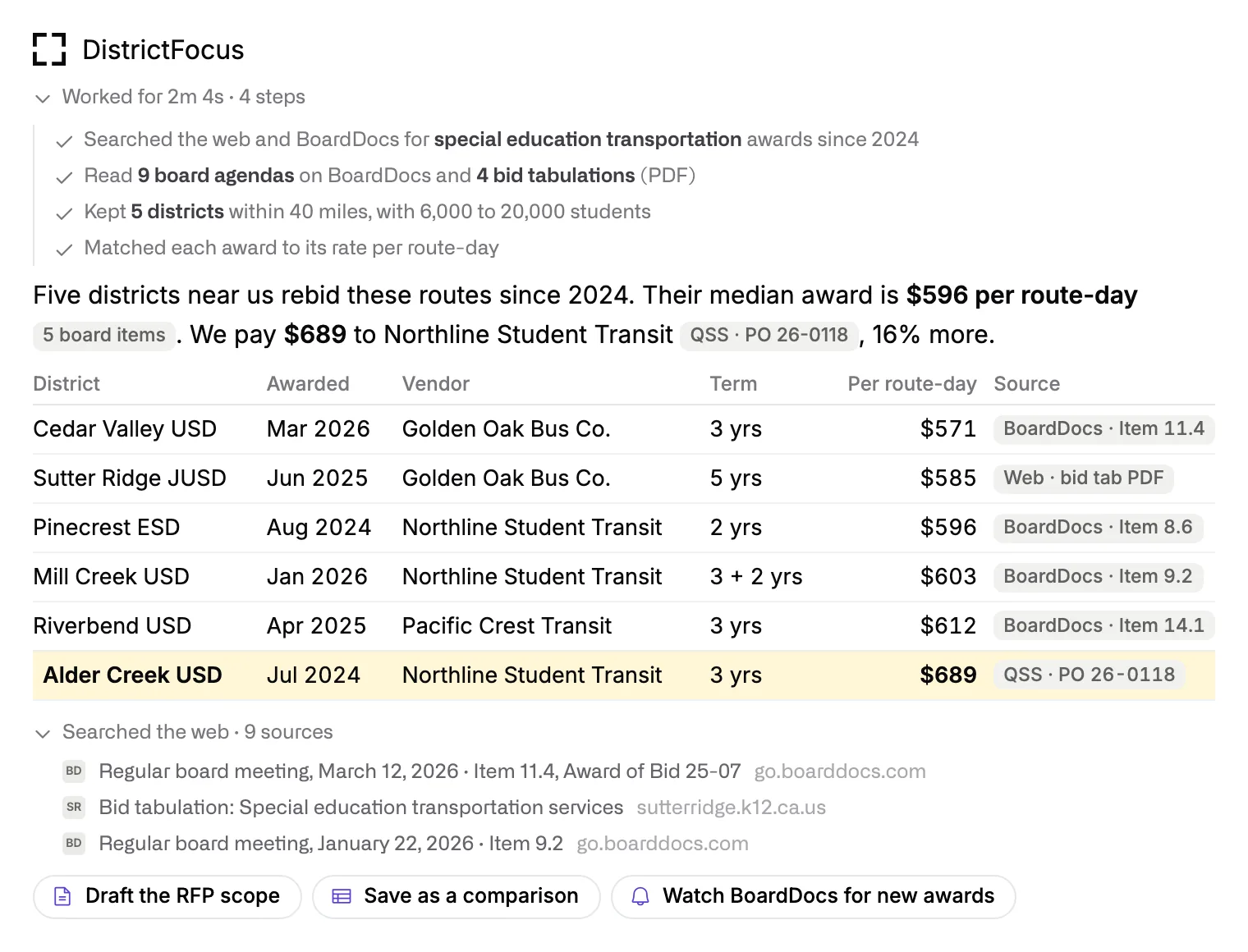
Show the board the true cost of our special education transportation, next to districts our size.

An answer comparing special education transportation awards in five nearby districts, each row sourced to a board agenda or bid document.

Shows where to look first when the budget gets tight.

It ranks your contracts by what you could recover, from prices above similar districts to licenses still billed for students who’ve left, and puts a date to act on each one.

Try asking

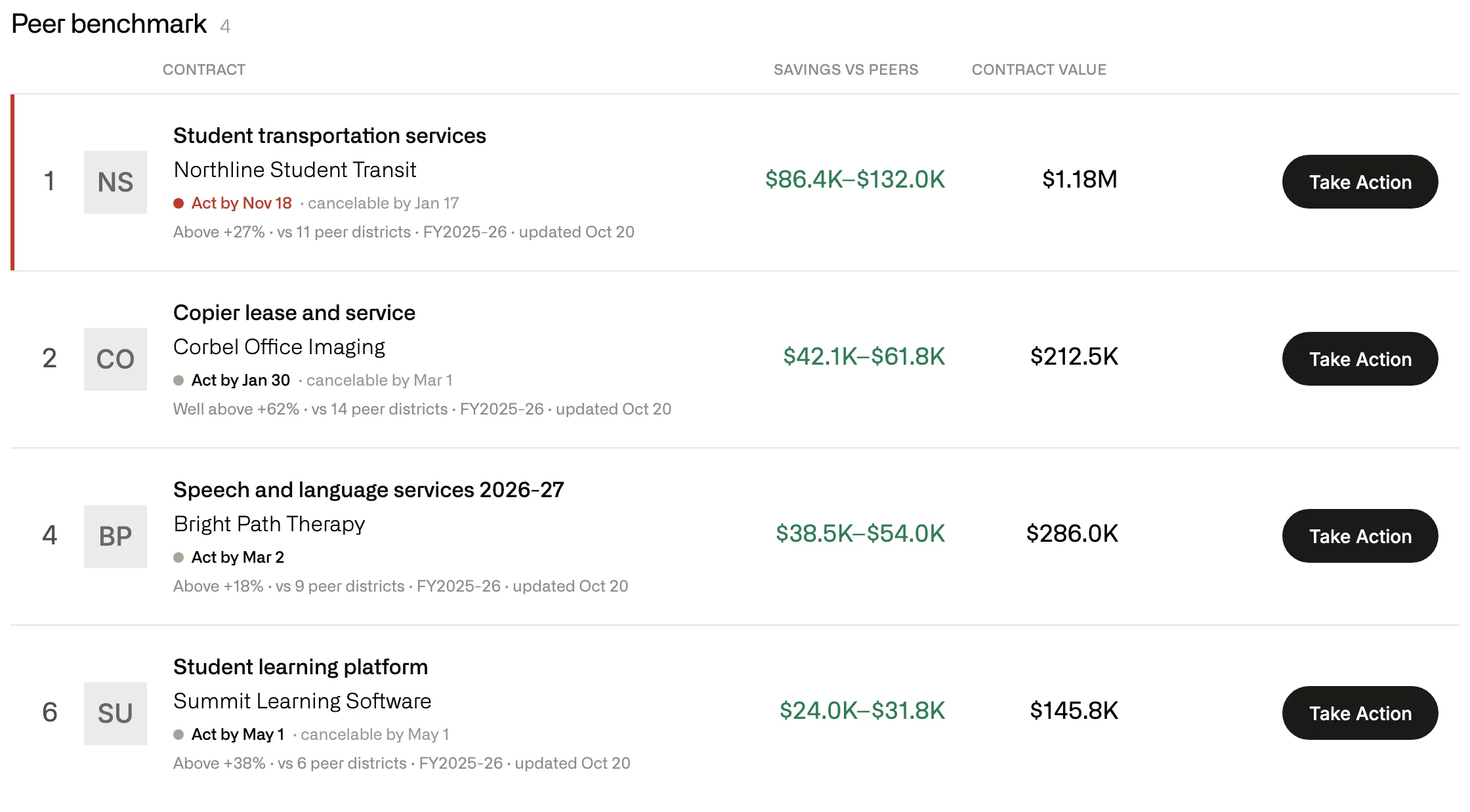
Where are we starting from? Rank the money in our contracts before the first interim.

A ranked list of contracts with the amount that could be recovered against peer districts, an act-by date and the contract value.

Keeps public records requests on the clock.

When a request lands in your office, it logs it, finds the records and drafts the response against the ten-day deadline. Nothing is released until someone on your staff sends it.

Try asking

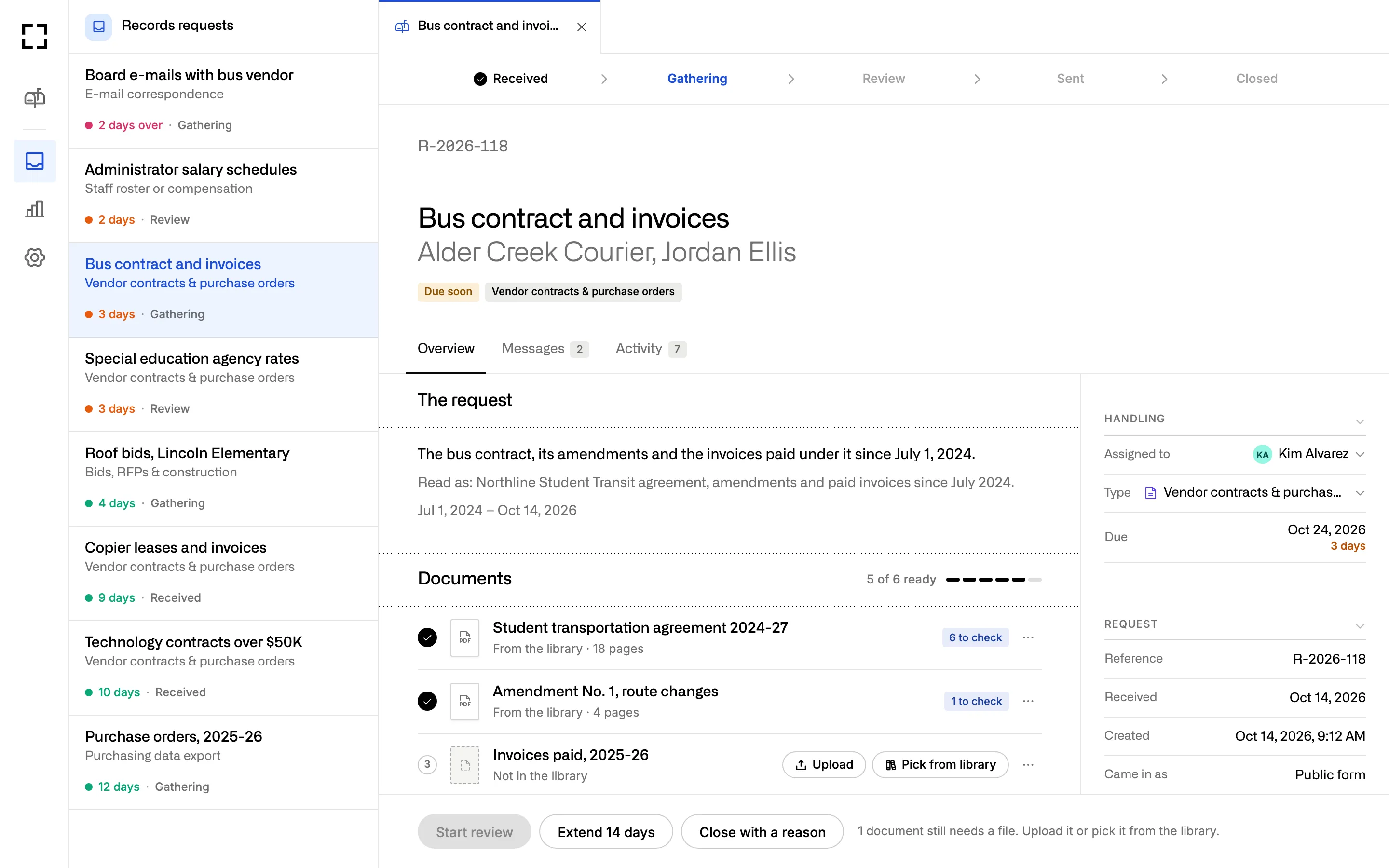
Which records requests are due this week, and which ones are still missing documents?

A records request at the Gathering step, with the request text, its due date and a checklist of documents found in the library.

Standing work

Work that shows up before you ask for it.

Turn any request into a routine. It runs on your schedule, reads the systems you’ve connected and puts the result where you’ll see it.

Workflows

A Friday note tells you what changed in your contracts.

Set it once and it runs every week, covering new contracts, notices coming due and spending close to a board approval. The brief before each board meeting runs the same way, five days ahead.

Try asking

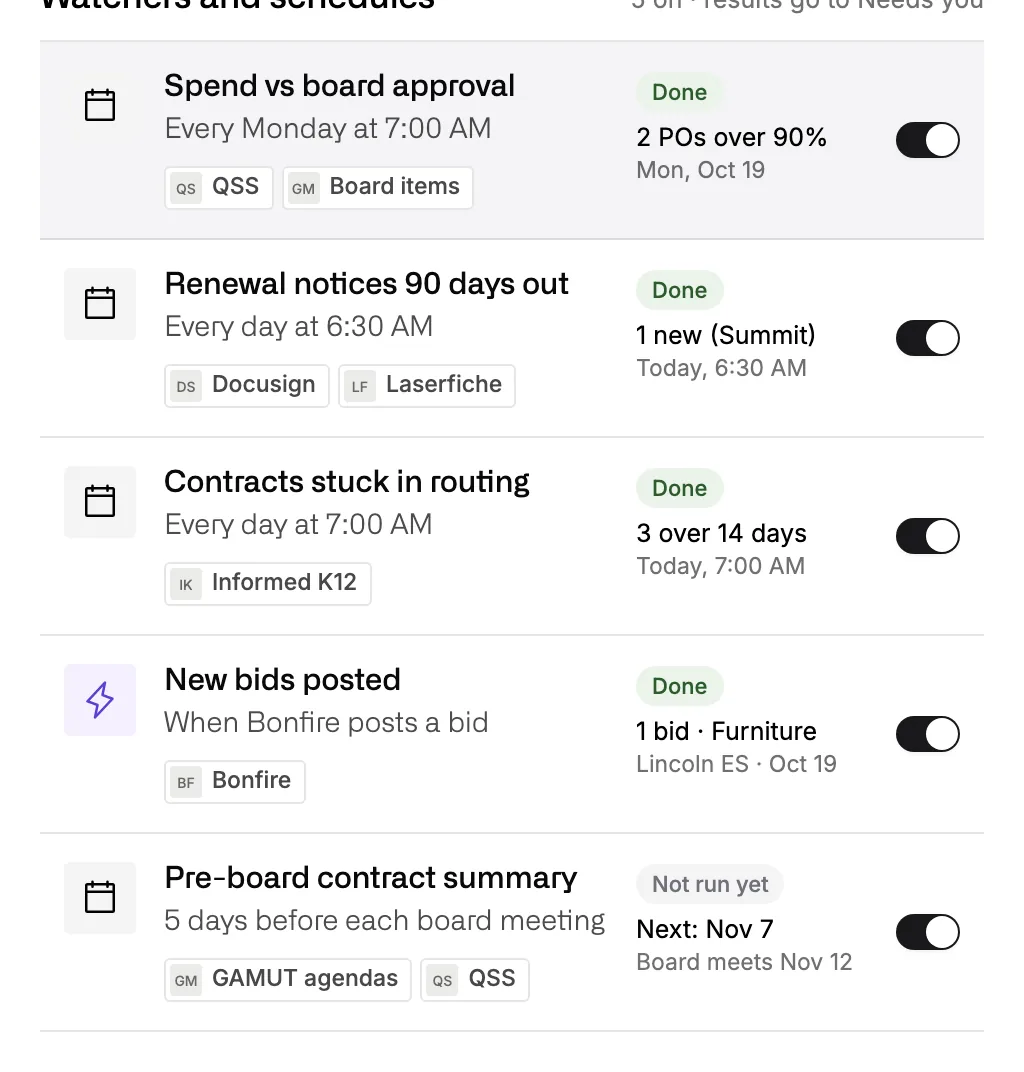
Every Friday at 3, send me five lines on what changed in our contracts this week.

A list of scheduled watchers, including a pre-board contract summary that runs five days before each board meeting.

Library

Every brief your cabinet asks for lands on one shelf.

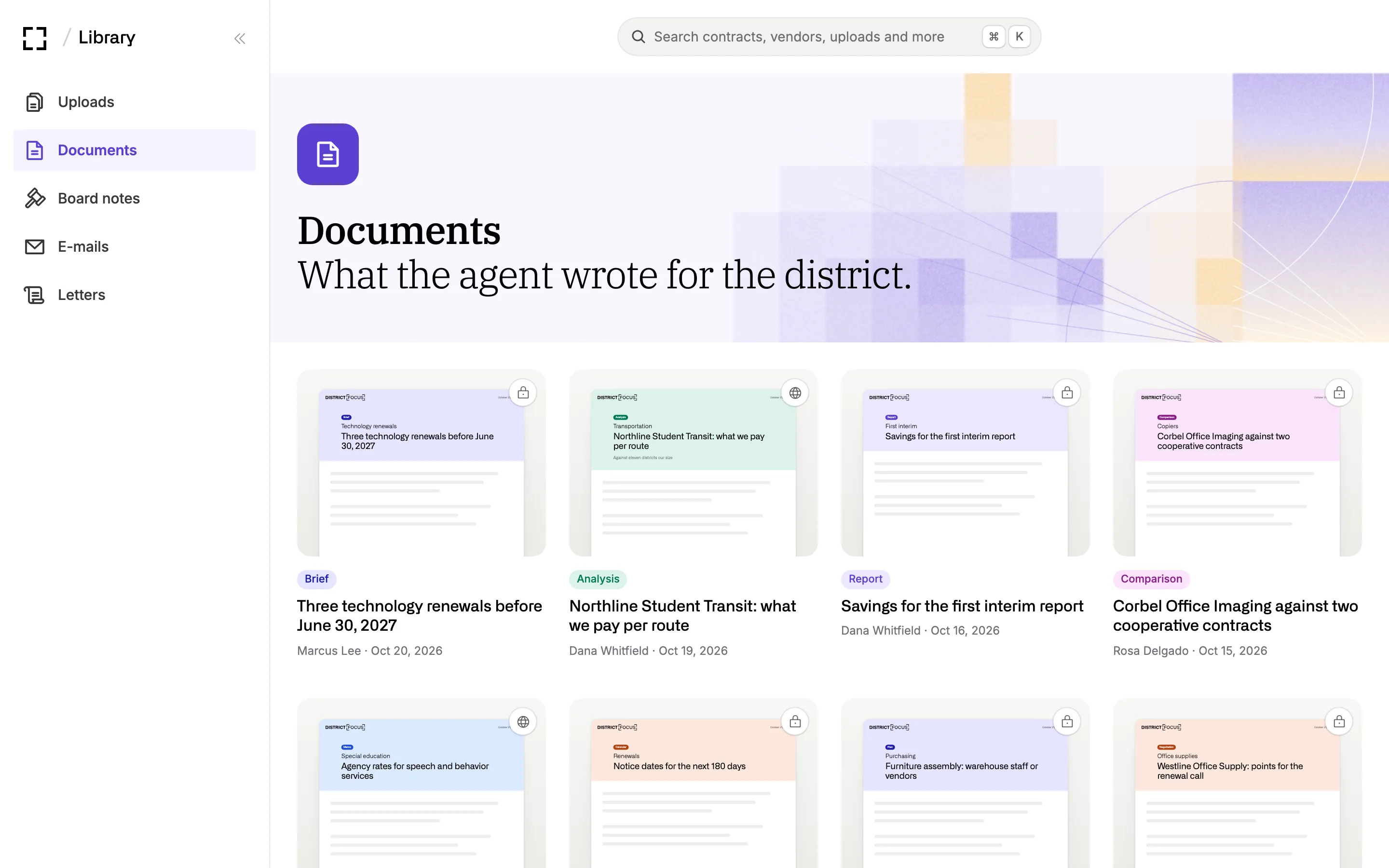
Briefs, analyses and board items the Assistant writes for anyone in your district go to the Library, labeled and searchable, so last spring’s analysis is there when the question comes back.

About the Library
The Documents shelf in the Library: briefs, analyses, reports and comparisons written for the district, with author and date.

Memory

It learns your cabinet and your calendar.

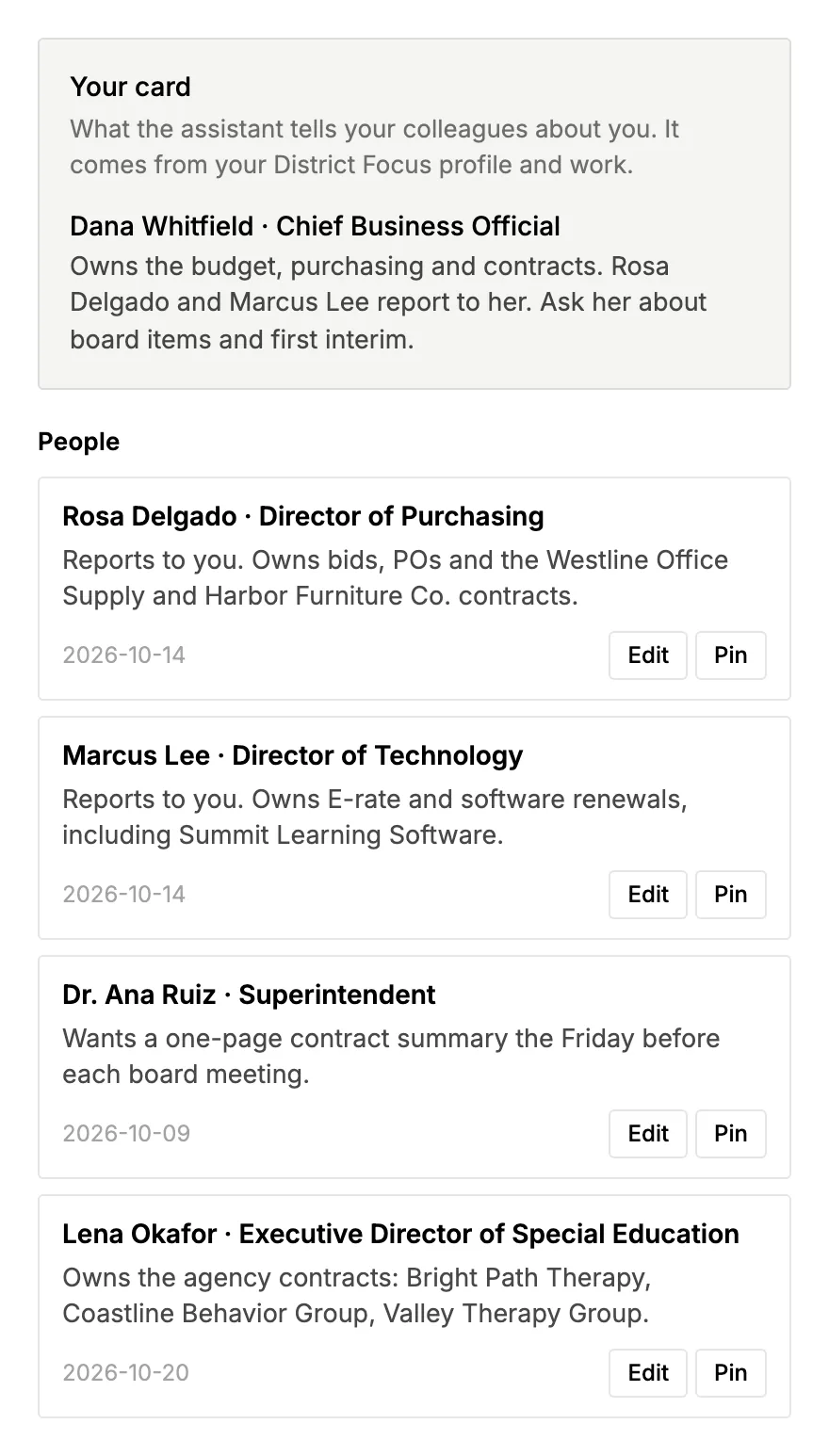
It starts with a short interview on the first day and keeps notes as you work: who owns which vendor, how you like a brief laid out, when the board meets. You can read, change or delete any note.

Memory notes about people in the district: the Director of Purchasing, the Director of Technology and the superintendent, Dr. Ana Ruiz.

Your year

Your year, and what arrives before each date.

Set routines around the California dates that run a superintendent’s year, and the work lands on your desk before each one.

  1. Every board meeting Coming up

    The board approves or ratifies each contract the district signs.

    Ed Code 17604

    What the Assistant hands you: A brief on each contract item, with the questions trustees may ask and draft answers.

  2. Sep 15 Coming up

    Unaudited actuals go to the board.

    What the Assistant hands you: Spending by vendor against last year, and what drove the change.

  3. Early Oct Coming up

    Census Day sets the enrollment count for the year.

    What the Assistant hands you: Per-student contract costs, re-run against the new count.

  4. Nov Coming up

    Trustee elections, in even-numbered years.

    What the Assistant hands you: A school finance primer for new trustees, built from your own budget and interim reports.

  5. Dec 15 Coming up

    First interim report, certified positive, qualified or negative.

    Ed Code 42130–42131

    What the Assistant hands you: A ranked list of the money in your contracts, with a date to act on each item.

  6. Jan Coming up

    The Governor’s budget proposal.

    What the Assistant hands you: One page on what the proposal changes for your district.

  7. Mar 15 Coming up

    Second interim report certified.

    Ed Code 42130–42131

    What the Assistant hands you: The contracts check, updated and written up for the board.

  8. May Coming up

    The May Revision.

    What the Assistant hands you: What changed since January, and which contracts it touches.

  9. Jun Coming up

    Budget and LCAP adopted after a public hearing, before July 1.

    Ed Code 42127, 52060

    What the Assistant hands you: Questions to prepare for the hearing, and the contracts that start July 1.

Try asking

Ask it the way you’d ask your cabinet.

Plain words work. These are requests a superintendent might hand it in an ordinary week.

  • Board

    What should I be ready to speak to at Tuesday’s board meeting?

  • Trustee

    A trustee wants to know why we hold five tutoring contracts. Draft my answer with sources by Thursday.

  • Analysis

    Where are we starting from? Rank the money in our contracts before the first interim.

  • Research

    Show the board the true cost of our special education transportation, next to districts our size.

  • Document

    Write a two-page school finance primer for our new trustee, from our own budget and first interim.

  • Workflow

    Every Friday at 3, send me five lines on what changed in our contracts this week.

  • Analysis

    Which of our large contracts serve a goal in our strategic plan, and which don’t?

  • Document

    Summarize the county’s budget letter: what it asks of us, by when, and who owns each item.

  • Analysis

    Are we still paying for students we no longer have?

  • Board

    Draft the board item for our block-grant plan, with the public hearing notice.

Systems

It reads the systems your office already runs.

It works from your board platform, your e-mail and shared drives, and public state data. Your admin connects each system and decides what the Assistant can see.

  • BoardDocs Board
  • Granicus Board
  • CSBA GAMUT Board
  • Outlook E-mail
  • Gmail E-mail
  • Google Drive Files
  • SharePoint Files
  • Microsoft Word Documents
  • Zoom Board recordings
  • Microsoft Teams Meetings
  • CDE Public data
  • The web Agendas and public sites

Privacy and security

What stays inside your district.

  • Each district works in its own space. People from another district can’t open your files, documents or chats.
  • A brief becomes public only when someone in your district publishes it, and the system records who did.
  • Every action the Assistant takes is logged: who asked, which tool, which records, and when.

Bring a question a trustee asked this year.

In the demo we’ll show you the Assistant working on that kind of question, and walk you through where your district’s data lives.